How to access and export controlled data to Terra via DUOS

· 3 min read

Step-by-step instructions to log into and set up DUOS to access controlled data for analysis in a Terra workspace.

AnVIL users: dbGaP authorization is still applicable to access AnVIL datasetsYou do not have to use DUOS to access controlled data. To enable dbGaP access, link your NIH account in Terra (enables access to controlled data granted by dbGaP in both Terra and the AnVIL Data Explorer). For step-by-step instructions, see Access controlled-data by linking your NIH account in Terra.

Step 1: Request access on DUOS​

1.1. Go to duos.org and click sign-up/sign in using MSFT or Google SSO. Use the same login you use for app.terra.bio. 

1.2. Accept the Terms of service.

1.3. In the Researcher Console, select Your Profile under your name (top right).

1.4. Once you land on the profile page, add your full name and select your institution from the dropdown (start to fill in the name). 

1.5. Link your eRA Commons ID. This will allow you to request access to controlled data.

You’ll be taken to the external NIH page to sign into your eRA Commons account.

1.6. Invite your signing official to duos.org to register and give you a library card. See How to pre-authorize researchers to submit Data Access Requests (DARs) in DUOS for instructions.

1.7. Once you receive a Library Card, login to the DUOS Researcher Console. You should see your library card in the Profile page.

1.8. Go to the Data Library (https://duos.org/datalibrary) and filter/search for the dataset you’re looking for. Note that the example dataset in this doc is GTEx, but the instructions are not specific to that dataset.  

1.9. Select the dataset of interest (circled in screenshot) and click apply for access at the bottom right.

1.10. Fill out your data access request form, with as much detail as possible.

1.11. Make sure to attest to all terms in the library card agreements (screenshot below) by clicking the blue Attest button.

1.12. Submit your DAR by clicking the blue Submit button (bottom left) beneath the addendum summarizing the requested datasets grouped by data use terms.

What to expect​

It will take a few days to a few weeks for your DAR to be approved. You will get a notification in your email when you have access to the dataset.

Step 2: Export snapshot to Terra from the DUOS Library​

2.1. Once your DAR is approved, return to the DUOS Data Library, where you should now see a blue Export link in the View by Dataset tab under Export to Terra (right column) .

2.2. Clicking the button should allow you to export to an existing Terra workspace or to create a new one.

2.3. Note that if you’re accessing controlled data, DUOS will automatically enable additional security on your new or existing workspace. 

What to expect​

DUOS will import the data snapshot to a new or existing workspace.

It will take a few minutes to export the snapshot. You’ll get a green popup (upper right) when data is in your workspace.

Once you refresh your page, you’ll see the data tables containing all the snapshot data and metadata in the Data tab of your workspace. Note the security shield at the top right indicating additional security monitoring.

NCURA Workshop: NIH Data Repositories

· 2 min read

Sofia Labrecque and Jonathan Lawson
The Broad Institute of MIT and Harvard

NIH Repositories: A Landscape Analysis​

See the full article here: https://papers.ssrn.com/sol3/papers.cfm?abstract_id=5374625

Workshop Reference Graphs​

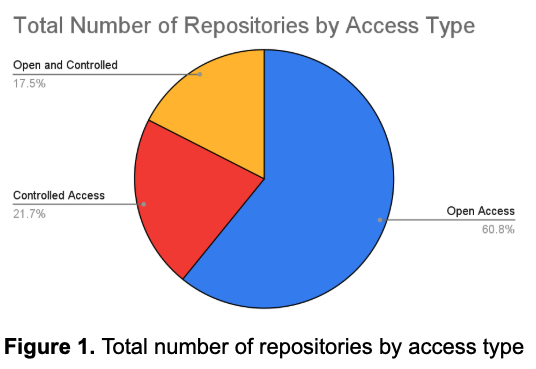
Total Number of Repositories by Access type
---
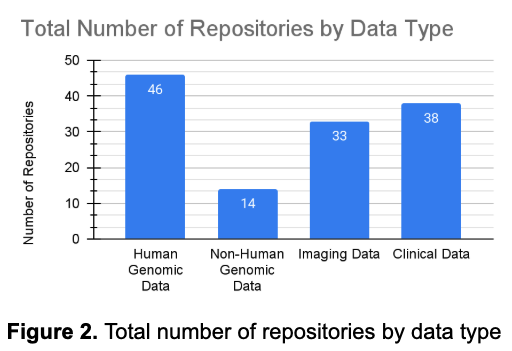
Total Number of Repositories by Data type

The NIH-Sponsored Repository list will be valuable to principal investigators (PIs)​

  1. Those who are looking for secondary data to use for their research.
  2. Those who need to identify a repository to submit data to, potentially as a part of their Data Management and Sharing (DMS) plan.

Additional Notes

  • The preprint SSRN paper (QR code on reverse) provides an overview of the NIH-sponsored repositories available and can serve as a good starting point in the search for a repository to submit to or to access data for secondary research.
  • When submitting data to a repository as part of NIH requirements, identify a repository and contact them early in the grant lifecycle, as you may need to vet multiple repositories and ensure schema alignment with the final chosen repository, and more.

NIH-Supported Scientific Repositories:

https://www.grants.nih.gov/new-to-nih/information-for/researchers/resources-for-research

How to Get a Library Card from Your Signing Official

· One min read

To submit a Data Access Request (DAR) in DUOS, you must first have a Library Card. This card is a form of pre-authorization issued by a Signing Official (SO) at your institution. It confirms that you are a researcher in good standing who may access controlled datasets.

Steps to Get a Library Card:​

  1. Find out who your Signing Official is. If you don’t know, its usually best to ask your compliance office, office of sponsored research, or legal department.
    If your institution has already designated one in DUOS, they can issue you a card directly.
  2. Ask your Signing Official to log into DUOS.
    They can log in at https://duos.org/so-console and issue you a Library Card from their dashboard.
  3. Wait for confirmation.
    Once the Library Card is issued, you’ll receive a confirmation email. At that point, you’ll be able to initiate and submit DARs and Progress Reports in DUOS.

If your institution does not yet have a Signing Official in DUOS, please reach out to your research administration team or contact the DUOS support team for help getting one onboarded.

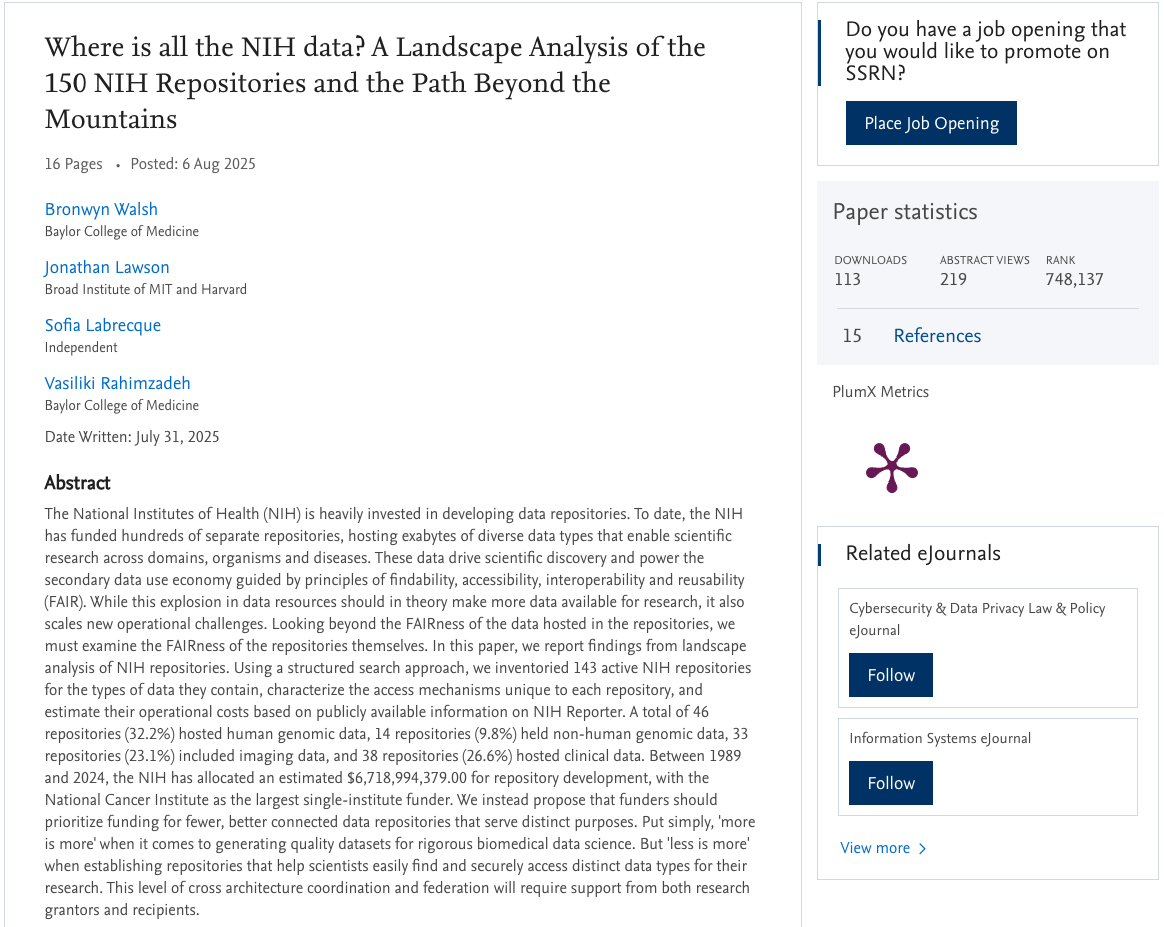
“Where Is All the NIH Data? A Landscape Analysis of the 150 NIH Repositories and the Path Beyond the Mountains.”

· One min read

We’re excited to announce a new SSRN publication co-authored by Bronwyn Walsh, Jonathan Lawson, Sofia Labrecque, and Vasiliki Rahimzadeh, “Where Is All the NIH Data? A Landscape Analysis of the 150 NIH Repositories and the Path Beyond the Mountains.”

This comprehensive study maps out the current NIH-supported data repository ecosystem—spanning roughly 150 domain‑specific and generalist repositories—and evaluates gaps and usability. It provides critical insights into how NIH data is organized, discoverable, and maintained across different platforms, while identifying challenges around access, metadata standardization, and sustainability.

The paper concludes with a forward-looking “path beyond the mountains,” recommending strategic improvements such as enhancing metadata harmonization, strengthening repository integration, and leveraging FAIR and GA4GH standardsto bolster discoverability and ease of datasharing and use across NIH-funded datasets .

DUOS Progress Reports User Guide

· 5 min read

Progress Reports at a Glance: Key Functions for Each DUOS Role​

The table below provides a quick overview of how Progress Reports support each distinct role within the DUOS ecosystem, highlighting their primary functions in managing data access lifecycles.

DUOS RoleKey Function of Progress Reports
Researchers:Submit updates for DAR renewal, DMI, or project closeout.
DACs:Review progress reports for renewals and approve closeouts.
Signing Officials:Approve researcher closeout requests and oversee institutional compliance.
Data Custodians:Receive notifications around their datasets’ access to understand who is using their data

For Researchers: Managing Your Data Access and Project Status​

When to Submit a Progress Report:

Once 11 months have elapsed from the initial approval of your Data Access Request (DAR), you, as the primary investigator (PI), will receive a notification prompting you to submit a Progress Report. This report is crucial for updating the Data Access Committee (DAC) on your research progress and for managing the continuity or conclusion of your data access.  

How to Submit a Progress Report:

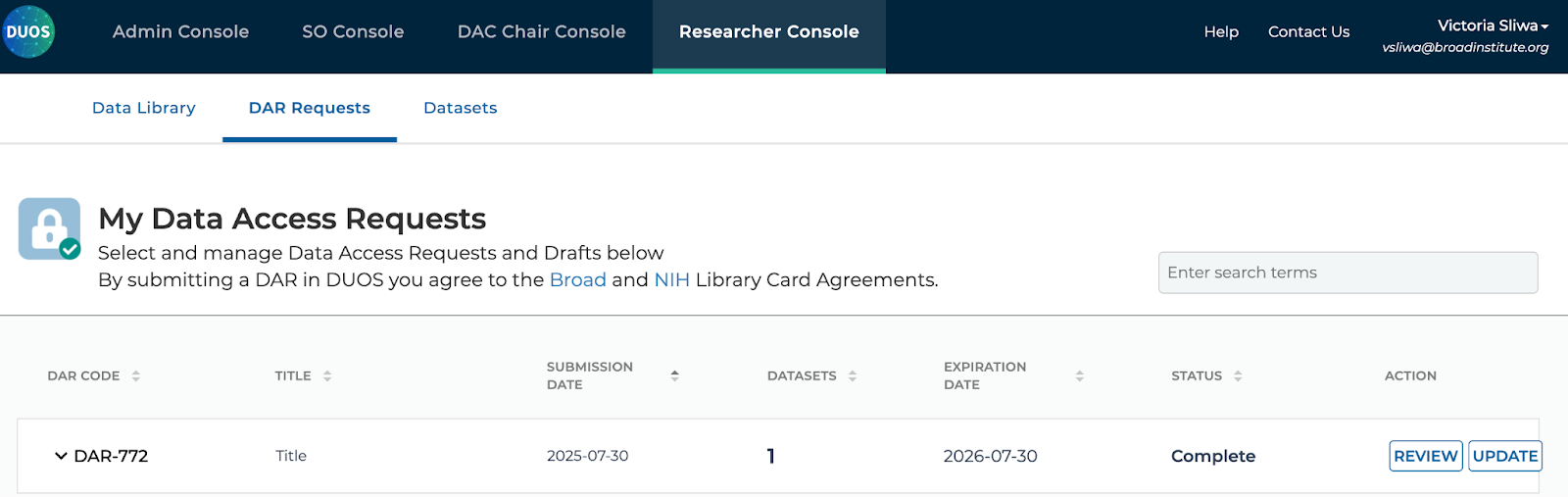
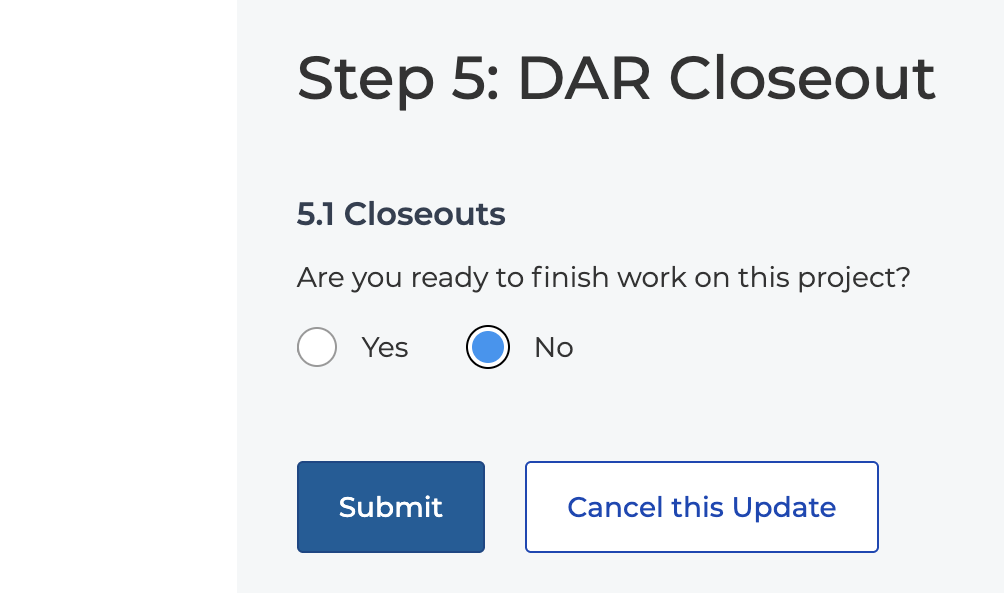
Under Actions, click Update

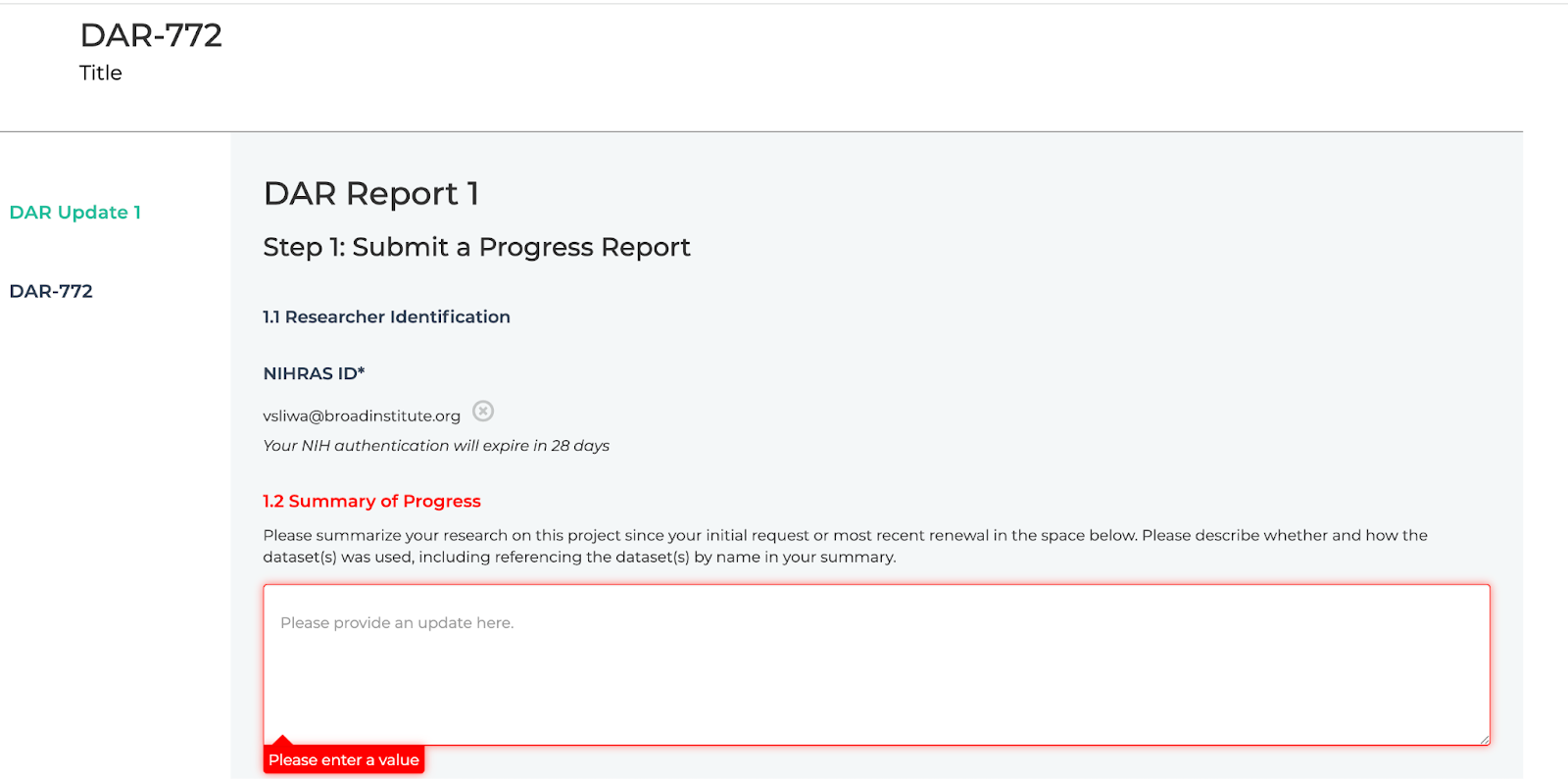
This will bring you to the progress report form – fill out all red required fields and any relevant optional fields.

Then hit submit at the bottom of the page after Step 5 to send your progress report to all relevant DAC(s).

Required Content for Progress Reports (for Renewal):

When submitting a Progress Report for the purpose of renewing your data access, you are required to provide the following information:

  • Summary of Research Progress: Detail the advancements made in your research since the initial DAR was approved.  
  • Intellectual Property (IP) Disclosure: Disclose any new intellectual property that has resulted from your research using the accessed data.  
  • Publications: List any publications (e.g., journal articles, preprints) that have been published or submitted since the initial DAR, utilizing the accessed data.  
  • Presentations: Detail any presentations (e.g., conference talks, posters) given since the initial DAR that feature findings from your research using the accessed data.  

Optional Uses for Progress Reports:

Beyond the required renewal updates, Progress Reports offer flexibility for additional communication and project management:

  • Update Internal Lab Staff: Share your research progress with your internal lab team.
  • Update Internal or External Collaborators: Keep your collaborators informed about the project’s status.
  • Report a Data Management Incident: If a data management incident occurs, you can use the Progress Report to formally document and report it.
  • Close Out the Project: If your research project is complete or no longer requires access to the data, you can initiate a project closeout through the Progress Report.

Project Closeout Process for Researchers:

If you choose to close out your project via a Progress Report, the approval flow differs from a renewal:

  1. Submission to Signing Official (SO): Instead of the DAC voting on approval, you will submit the closeout request directly to your institutional Signing Official (SO) for their review and approval.
  2. SO Approval: Your SO will review the closeout request and, if approved, it will be sent to the DAC Chair(s).
  3. DAC Chair Approval: After your SO’s approval, the DAC Chair must provide the final approval for the project closeout.

By utilizing Progress Reports, you gain clear visibility into your data access status, streamline compliance, and efficiently manage your research project’s lifecycle within DUOS.

For Signing Officials (SOs): Strategic Oversight and Closeout Approvals​

Approving Project Closeouts:

When a researcher initiates a project closeout through a Progress Report, your role as an SO is critical for institutional approval:

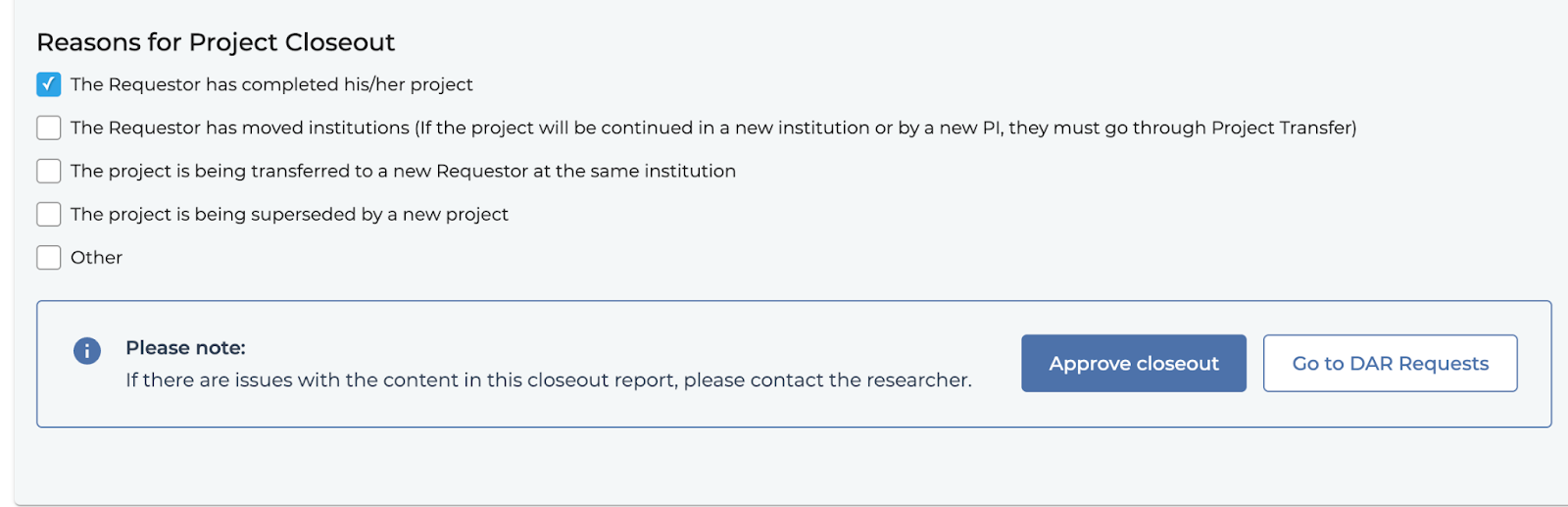
Review and Approval: The researcher will submit the closeout request directly to you, their institutional Signing Official, for initial review and approval by indicating you are their signing official on the closeout form. You will receive an email with a link to the progress report containing a closeout for you to review and approve. The associated action is “Review Closeout”:

Clicking Review Closeout brings you to a read only version of the Progress Report(s) and original DAR, underneath the most recent progress report will be an option to approve the closeout. 

Clicking Approve closeout moves the progress report to the DAC Chair(s) for final approval.

For Data Access Committees (DACs): Reviewing Progress and Approving Closeouts​

Reviewing Progress Reports for Renewal:

When a researcher submits a Progress Report for the purpose of renewing their data access, your role as a DAC remains focused on reviewing the submitted information to ensure continued compliance with data use limitations and consent forms. Progress Reports will provide you with updated information from the researcher to understand their progress on their research project, supporting record-keeping and consistency in the review process while preserving the link to the original Data Access Request.  

You will receive an email that a Progress Report has been submitted for review if you’re a chair, or open for voting if you are a DAC member (after your Chair has opened the Progress Report). Voting proceeds as it would for any other DAR.

Approving Project Closeouts:

The process for approving a project closeout initiated via a Progress Report differs from a standard DAR review:

 You will receive an email with a link to the progress report containing a closeout for you to review and approve after it has been approved by the Researcher’s SO. The associated action is “Review Closeout”:

Clicking Review Closeout brings you to a read only version of the Progress Report(s) and original DAR, underneath the most recent progress report will be an option to approve the closeout. 

Clicking Approve closeout moves the progress report and DAR collection to a closed state, completing the closeout process.

GA4GH Data Passports: Proposing a New Technical Specification for Data Policy Representation

· One min read

We’re excited to share a new paper by Jonathan Lawson and Tom Conner, “GA4GH Data Passports: Proposing a New Technical Specification for Data Policy Representation,” now available on SSRN. This work introduces a proposed technical specification for Data Passports, a framework designed to streamline data use while upholding ethical provenance. By encoding these metadata as standardized, machine-readable “visas,” Data Passports enable faster, more secure, and interoperable access to research datasets.

Designed as a companion to the existing GA4GH Passports standard, this proposal outlines how institutions and data access committees can issue trusted assertions about a dataset. This approach reduces administrative burden and supports scalable, federated data governance. The paper also highlights future directions, including trust frameworks and expanded visa types, to further advance responsible and efficient data sharing.

Announcing ‘Progress Reports’ in DUOS! Renew Access & Share Your Research Faster

· 2 min read

DUOS streamlines the process of sharing and requesting data, and is now expanding institutions’ and researchers’ ability to renew their access to datasets, and share their research with the scientific community!  

Why ‘Progress Reports’?​

When using controlled-access data, access is typically granted for one year by a data access committee (DAC). To help researchers extend their data access as needed, assist DACs in overseeing and enabling data use, and share details on the important research progress by DUOS users, DUOS introduces Progress Reports.  

Before Progress Reports, researchers in DUOS needed to make a new Data Access Request to extend data access, which put redundant administrative work on researchers and left DACs with less than desirable data linkage and research output information. Now with Progress Reports in DUOS, access renewals, research updates, publications, presentations, collaborator changes, data management incidents and closeouts linked to the original DAR in a single auditable and shareable provenance chain – lightening the work on researchers and DACs to share data and research results faster! 

How do Progress Reports benefit different users in DUOS?​

In DUOS…
ResearchersSubmit DARs, Progress Reports, DMIs, and DAR Closeouts
DACsReview DARs, Progress Reports, DMIs, and DAR Closeouts
Signing OfficialsAudit DARs, Progress Reports, DMIs, and approve DAR Closeouts

When Should Researchers Submit a Progress Report?​

In DUOS, your access to data via a DAR will expire 12 months after initial approval. DUOS will send the PI on the DAR a reminder to complete a Progress Report, to either renew access or closeout the DAR, 30 days prior to the DAR’s expiration. If you do not submit and receive approval for your Progress Report before the expiration, your access will suspended until a Progress Report is approved, or you submit a new DAR for the data. 

Additionally, researchers can submit Progress Reports at-will to update DACs of exciting developments in their research, including sharing information about presentations, publications, or intellectual property developed in the course of their research. This information will be shared publicly and promoted by DUOS to help draw attention to your research!

We hope you enjoy this new feature and we look forward to sharing your research with the world!​

Filter data by Data Use & Access terms, DACs, and Data Types

· One min read

Finding the right dataset just got easier in DUOS!

We’ve added powerful new search filters that help you quickly narrow down datasets by the criteria that matter most. You can now filter data by:

  • Data Use & Access terms – Find datasets that align with specific research purposes or consent requirements
  • Data Access Committees (DACs) – View datasets stewarded by specific DACs for easier coordination and transparency
  • Data Types – Focus your search on genomics, phenotypic, clinical, or other data types relevant to your research

These filters make it faster to discover the right data, streamline your access workflows, and ensure you’re working with datasets that meet your project needs.

Try the new filters today—log in to DUOS and start exploring with precision!

Solving the Catch-22 in searching for controlled access data

· One min read

​In his latest paper, Jonathan Lawson of the Broad Institute introduces View-Only Data Access Requests (VODAR), a novel approach designed to enhance the discoverability of controlled-access datasets. VODAR enables researchers to explore sensitive data in depth without compromising compliance or participant consent, addressing a significant barrier in genomic and biomedical research. This framework aims to streamline data access while upholding ethical standards, potentially accelerating scientific discovery. Read the full article here: https://papers.ssrn.com/sol3/papers.cfm?abstract_id=5170433

Are you compliant with NIH’s updated Genomic Data Sharing policy?

· 2 min read

On July 25, 2024, the National Institutes of Health (NIH) issued updated guidance to the Genomic Data Sharing Policy stating that researchers approved for controlled-access NIH data, via mechanisms like dbGaP or DUOS, must store and analyze this data on systems that are NIST SP 800-171 compliant (or the equivalent ISO/IEC 27001/27002) starting January 25, 2025.

If you are using Terra or NIH Platforms like AnVIL that are powered by Terra, you are already compliant.

The update requires researchers and institutions using NIH controlled-access data to attest that  systems interacting with this data are compliant with NIST SP 800-171. Many university and institutes’ IT departments are urgently determining remediation pathways for their internal clusters and systems, including what new policies and training will need to be rolled out to their staff to be compliant by January. While many institutions are rapidly working to identify, invest, and implement critical security upgrades to meet NIST SP 800-171 compliance, it is vital that IT and compliance departments can inform researchers about which systems meet these security criteria.

Luckily, there is a solution: Terra and NIH platforms like AnVIL that are powered by Terra already meet NIST SP 800-171 as well as the more rigorous NIST SP 800-53 (FedRAMP Moderate). IT and compliance departments can direct users to Terra and AnVIL, and simply acknowledge use of these systems in the attestation process. It’s as easy as that!

If you have any questions or would like to discuss your specific situation, please contact support@terra.bio. We would be glad to assist you.